A golden board for AOI programming is a fully assembled board from your current production build that you have verified as defect-free. With CAD-free programming, it is the only input the AOI needs: the system learns what every part and joint should look like from that one board. That makes the choice of board important. If the golden board carries a defect, the program learns it as normal. This guide covers how to pick a board that is truly known-good, how to verify it, and what to prepare at the machine.
How the AI builds a program from the board is explained step by step in AOI programming without CAD files. This article is about the board itself.
What is a golden board in AOI?
A golden board is the reference the AOI compares production boards against. On a traditional AOI, the reference board is used mainly for alignment and threshold setting, while the inspection logic comes from CAD data and a component library. On a CAD-free AI AOI such as DaoAI's, the golden board is the specification: the AI finds the components on the board image, generates the inspection boxes and sets starting limits from what it sees. No CAD file, Gerber or component library is required.
Because the board defines "good", a golden board must be:
- Current: the same revision and the same fitted parts as the boards you will inspect.
- Typical: built on the production line with the normal process, not a hand-built sample.
- Verified: checked and confirmed defect-free before you program with it.
How do you choose a golden board?
Pick a board from the first stable run of the build you are about to inspect, not from a pilot or a prototype lot. Use these criteria:
| Check | Why it matters |
|---|
| Same PCB revision and same assembly revision as production | A different revision can move, add or remove parts, and the program will flag every difference. |
| Same fitted parts as the production build | A part that is missing on the golden board is not programmed and will not be inspected. |
| Parts from the suppliers you currently use | Body color and marking differ between suppliers. The program learns the look it sees. |
| Built on the production line with the normal reflow (and wave) profile | Solder fillets from a reworked or hand-soldered board do not look like production joints. |
| No rework anywhere on the board | Reworked joints and extra flux residue become part of "good". |
| Clean and flat | Fingerprints, dust, flux residue and warp change the image and the alignment. |
How do you verify that a golden board is really good?
Verify the board before it goes into the AOI, with the same care you would give a first-article inspection:
- Visual inspection under magnification against your acceptance class (for most shops, IPC-A-610). Check polarity, part values and markings, and every solder joint.
- Compare against the BOM and the assembly drawing, so that every fitted part is present and correct and every not-fitted position is empty.
- Use any electrical test you already run (in-circuit, flying probe or functional test) as a second check.
- Label and store the board. Keep it in an ESD bag with the revision written on it, so that the next program change starts from the same reference.
A golden board that passes all four is the best protection against the main risk of this method: a defect on the reference board being learned as normal.
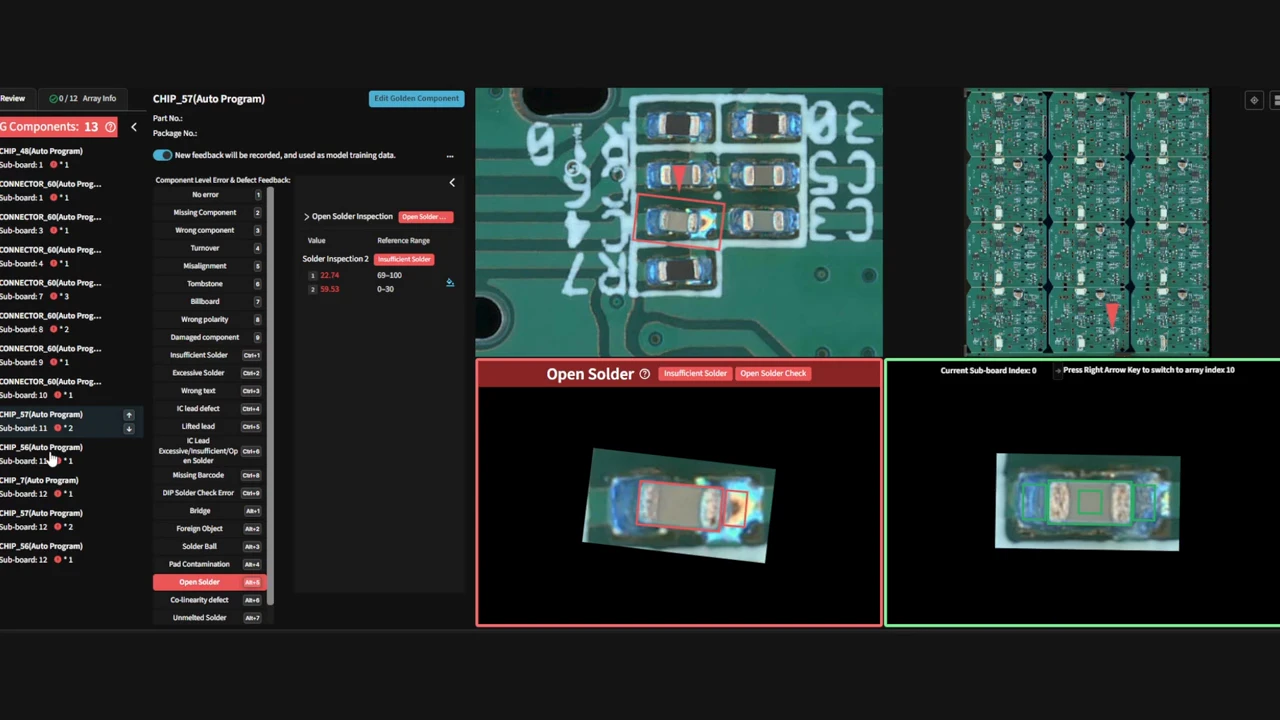
The software also helps: after auto-programming, components it is not confident about (for example low confidence or an unusual size) is flagged as unhealthy, so you can review those parts before the program goes into production.
What do you prepare at the machine?
On a DaoAI AOI, programming from a golden board takes these steps:
- Create the product: enter a name and the PCB size.
- Load the golden board and capture the full board image.
- Draw the inspection region. For a panel, enter the rows and columns, draw around one representative board, and the system finds and aligns the others.
- Choose which inspection types to generate, then run auto-programming.
- Set the fiducial (mark) points, review the generated inspection boxes and fine-tune where needed.
Generating the inspection boxes takes about 30 seconds, and the AI then trains on the board automatically. In total, every DaoAI AOI programs itself from one golden board in 30 seconds to 5 minutes, depending on the board. Panels are covered in more detail in panel and array AOI.
Do CAD files still help?
CAD is optional, never required. If you have the pick-and-place (XY) file, you can import it as a CSV or text file with designator, X and Y columns, plus package and part number if you have them. The AOI then fills in reference designators and part numbers and groups parts by package, which makes reports and traceability easier to read. The golden board still defines what each part should look like.
What if you do not have a golden board yet?
For NPI and first builds there is no proven board yet. Build the first boards, verify one with the steps above, and program from it. Until the program has seen a few production boards, review every call closely. Changes then fit into the same program:
- A small layout or part change: re-run auto-programming only inside the changed area and keep the rest of the program as it is.
- A new supplier for the same part: accept the new look as an alternate part from the review screen and retrain, instead of reprogramming.
- A new revision with many changes: verify a new golden board and program again. It takes minutes, not hours.
Which golden-board mistakes cause problems later?
- Using a reworked or hand-built board: its joints do not match production, so good production joints get flagged.
- Using a board with an unnoticed defect: the defect is learned as normal and passes on every later board. Run a second known-good board and review the first production boards to catch this early.
- Using a board from an old revision or another BOM build: every difference becomes a call, or worse, a part that is not on the golden board is not inspected.
- Skipping the review of generated boxes: very small parts can be missed by auto-programming and need to be added by hand.
False calls that remain after programming are handled in review, which is covered in AOI false call review.
Frequently asked questions
Do I need more than one golden board?
No. One verified board is enough to program. A second known-good board is a useful check: run it after programming and review any calls it gets.
Can a reworked board be used as a golden board?
Avoid it. Reworked joints and extra flux do not look like production joints, so good production boards get flagged, or rework-like joints are accepted as normal.
Do I need CAD, Gerber or a component library?
No. CAD is optional: a pick-and-place (XY) file adds reference designators and part numbers if you have one. No Gerber file or component library is required.
How long does programming from a golden board take?
Every DaoAI AOI programs itself from one golden board in 30 seconds to 5 minutes, depending on the board.
What happens if the golden board has a defect?
The program learns the defect as normal and can pass it on later boards. Verify the board before programming and review the first production boards closely.
Test it on your own board
Send us one of your own boards and we'll test it free of charge. You will see the program built from your golden board, and the result on your board. See the DaoAI AOI range.